Reminder Emails
We understand that keeping track of appointments can some times be alot. At Empower when you have an appointment with us we have our system setup (using Calendy) to send you email and text reminders. On this page we are going to take you through if you are not receiving the email reminders.
Gmail
-
The first point of call is to check your Spam folder. If you see the reminder there then you can right click on the email and choose not spam. and this will move the email back to your inbox

-
You can proactively make sure that you receive all invites from us.
-
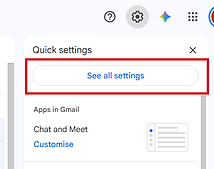
Go to the gear/cog icon at the top right of your page.
-
Select See all settings
-
Select Filters and blocked addresses
-
Create a new filter
-
Put this address into the from field: notifications@calendly.com
-
Click on Create Filter
-
Check the box for "Never send it to spam"
-
Lastly click on the create filter button.
-
You should now have a filter showing in your list